Capture, Discover, follow up
LeadFlow captures leads, tracks them in a pipeline, and on Pro/Business scores and follows up. Built for solo founders and small B2B teams.
New to capture and scoring? Read our lead scoring rules (70+ is hot) before you start.
Leave your details
Captures a lead. We'll follow up on business days. Book a 30-min Product Demo separately if you want a walkthrough.
What can LeadFlow capture, score, and follow up?
Capture and pipeline live on Free. Sequences on Pro log Day 1 → 3 → 7 Email accepted; tasks are due dates — not reminder emails.
See how each capability works in practice on our features page.
Lead capture widgets
Six on-site widgets on LeadFlow — exit-intent, slide-in, promo bar, lead magnet, A/B form (two headlines in this browser), and FAQ chat — plus one embeddable name/email form for your website (Business).
Lead scoring
On Pro/Business: 13 default rules you toggle and re-point (source, stage, value, corporate email, recency). Pipeline cards flag 70+ as hot; email alerts fire at 80+ when delivery is configured. Automations can watch any score you pick.
Visual pipeline
Drag-and-drop Kanban. Reorder stages on every plan; add/rename/recolor/delete on Business. Weighted forecast (stage probability × value) lives in Analytics on Pro and Business.
Stage counts and spend
Stage counts and source mix on every plan. Weighted forecast and tagged win rate / revenue by source are Pro/Business — not spend or ROI.
Email sequences
On Pro/Business: timed follow-up sequences with enrollment tracking. Each step is scheduled via Resend and logs Email accepted — not an inbox receipt. Sequences do not track opens or book the call for you.
Tasks with due dates
On Pro/Business: follow-up tasks with due dates, priority, and optional assignee and lead — not reminder emails or push. Playbooks on every plan are the Free follow-up path.
Campaign tracking
Campaign management with budget vs. spend on every plan. Tagged win rate and revenue by source are Pro/Business — not spend or ROI.
Data privacy
GDPR export and deletion from Settings, hashed API keys, and a per-lead timeline — not a workspace audit log.
Competitor tracking
Business plan: log the rivals you win and lose against, tag deals, and see win-rate stats from those tags — not a market-share report.
Webhooks & MCP
Outgoing webhooks you paste into Zapier or Make on every plan. Inbound Typeform/Calendly/Stripe URLs and an MCP server need a Business API key.
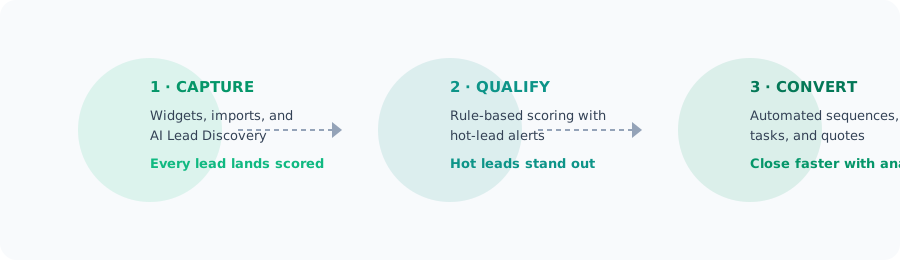
How do you capture, qualify, and follow up?
Capture
Import a list, run Discover, or paste the Business embed on your site. LeadFlow’s landing also has six on-site widgets. Every lead lands in your pipeline with a source tag.
Qualify
On Pro/Business, scoring rules score every lead 0–100 and flag 70+ as hot. Email alerts fire at 80+ when delivery is configured. Tasks and sequences (also Pro) run the follow-up you configured.
Follow up
Track deals through your pipeline. Sequences, tasks, and quotes are Pro. High-score emails fire at 80+ when delivery is configured — not a live in-app feed.
LeadFlow's three-step process — capture, qualify, follow up — means every lead in your pipeline has a source, not just a name. Scoring, tasks, and sequences on Pro add a score and follow-up. They do not invent a next-action engine.
What ships in LeadFlow today?
Sign up free for capture, pipeline, Discover, and booking. Scoring and sequences are Pro; competitor tracking is Business.
See the complete breakdown on our features page.
Capture leads on LeadFlow — or embed one form
Six on-site widgets on LeadFlow — exit-intent, slide-in, promo bar, lead magnet, A/B form (two headlines in this browser), and FAQ chat — plus one embeddable name/email form for your website (Business).
Score and flag 70+ as hot
On Pro/Business: rule-based scoring. Pipeline cards flag 70+ as hot; email alerts fire at 80+ when delivery is configured. Playbooks are on every plan. Discover finds local businesses on Free with limits.
Schedule follow-up on Pro
Email sequences, automations, quotes, and tasks on Pro. Outgoing webhooks you paste into Zapier or Make on every plan. Inbound receivers and MCP need a Business API key.
Capture, pipeline, Discover, and booking are on Free. Scoring, sequences, and automations are Pro. Embed form, API, and MCP are Business.
How do you capture, Discover, and follow up from one workspace?
Capture on landing widgets or a Business embed, Discover by city and type, score on Pro, then follow up with playbooks or Day 1 → 3 → 7 sequences.
Lead generation is a pipeline, not a page. It starts with capture — the exit-intent popups and slide-ins on LeadFlow’s landing — continues with scoring, covered in our lead scoring rules (70+ is hot), then Pro email sequences (via Resend) run the follow-up you enrolled — they log Day 1 → 3 → 7 Email accepted, they do not book the call — see our five-email ask-for-the-call playbook.
In practice, a landscaping company can run a couple of Lead Discovery searches to find local businesses near each active job site, then run a Presence Audit on the ones with a public web footprint. Scoring and email sequences are Pro — on that plan that's 50 searches a month. Emails land only when they appear in the source. See how each piece works on our features page, or compare the full setup on our pricing page. For how enterprise teams run lead management at scale, Salesforce's blog regularly covers scoring and follow-up.
A lead is just a contact until you score it. Scoring on Pro/Business flags 70+ as hot and emails at 80+ when delivery is configured — a priority number, not a close-rate guarantee.
How does LeadFlow compare to a CRM or a spreadsheet?
LeadFlow is a capture → Discover → score → follow-up workspace — not a HubSpot suite and not a spreadsheet.
LeadFlow captures on its own landing widgets, plus one embeddable form on your site (Business). Scoring and email sequences are Pro/Business. Pipeline cards flag 70+ as hot when you are on Pro — a priority, not a close-rate.
Capture, scoring (Pro), and follow-up live in one workspace. Compare it to the playbooks we publish on our blog and see what ships today.
| Feature | LeadFlow | HubSpot | Spreadsheets |
|---|---|---|---|
| Free plan | Yes — 100 leads, 2 Discover, 1 audit | HubSpot Free CRM — read HubSpot’s live catalog | Free, but manual |
| Starting price (paid) | $24/mo Pro (3 users) | Per-seat hubs — read HubSpot’s live catalog | $0 — your time |
| Lead capture widgets | 6 on LeadFlow landing; 1 embed (Business) | Forms and capture tools — read HubSpot’s live catalog | None |
| Discover (public web) | City + type, emails if in source (~30 public emails per run) | Not LeadFlow Discover — read HubSpot’s live catalog | None |
| Email sequences | Included on Pro | Sequences live in paid hubs — read HubSpot’s live catalog | Manual |
| MCP CRM tools | 19 tools on a Business API key — not Discover, scoring, or send-email | Not a LeadFlow MCP equivalent | None |
| Competitor tracking | Tagged win/loss on Business — not market share | Deal competitor field — read HubSpot’s live catalog | Manual |
| GDPR data deletion | Workspace wipe in Settings (not the account) | HubSpot account tools — read their live catalog | Manual |
Not sure what you need? Read our guide to picking a lead scoring setup or start free and upgrade when you need scoring, sequences, or more Discover searches. HubSpot's marketing blog is a useful reference for how the broader lead management ecosystem works.
Most teams don't lose deals to competitors — they lose them to slow, manual follow-up. Playbooks on every plan, plus Pro sequences (Day 1 → 3 → 7) that log Email accepted — they do not book the call.
What can you do once you sign in?
Add a lead, run Discover, move a card, track a campaign, and turn on landing widgets. Scoring, sequences, and the embed form stay plan-gated.
Add your first lead
Manually add a lead or import a CSV to populate your pipeline.
Discover leads by city and type
Use Lead Discovery to find businesses by city and type on the public web.
Move a lead through your pipeline
Drag leads between stages to track their progress.
Create a campaign
Set up a marketing campaign to track budget vs. spend (tagged win rate by source is Pro).
Enable capture widgets
Turn on exit-intent, slide-in, and FAQ chat on the LeadFlow landing page.
What does LeadFlow cost?
Free $0, Pro $24/mo, Business $59/mo. Start free. Upgrade when you need scoring, sequences, or more Discover searches.
Free
Capture, pipeline, 2 Discover searches
- 100 leads
- 1 user
- Pipeline & dashboard
- CSV import/export
- 2 Lead Discovery searches
- 1 Presence Audit
- LeadFlow's own booking slots
Pro
Scoring, sequences, 50 Discover searches
- 5,000 leads
- 3 users
- Lead Discovery (50 searches/mo)
- 5 Presence Audits/mo
- Email sequences & automations
- Quotes (HTML download; mark-sent does not email)
- Lead scoring
Business
Unlimited leads, embed, API, and MCP
- Unlimited leads
- Unlimited users
- Lead Discovery + Presence Audit (unlimited monthly searches; ~30 public emails per run)
- Competitor tracking
- One-send broadcasts
- Custom fields & pipeline stages
- Embeddable lead form + API + MCP
- Priority support (faster replies, not a same-day SLA)
At $24 a month for 5,000 leads and 3 users, Pro bundles capture, scoring, and follow-up — not per seat. Embed, API, and MCP are Business.
Ready to capture and follow up?
Yes — LeadFlow is free to start in the browser. Sign up, import a CSV or run Discover, and track deals through your pipeline. The embed form is Business; scoring and sequences are Pro. The free plan includes 100 leads, 2 Discover searches, and 1 Presence Audit — no credit card.
 Built by Md Syful Islam, founder of LeadFlow
Founder of LeadFlow. Built a capture → Discover → score → follow-up workspace for solo and small B2B teams.
Frequently asked questions
Here are short, direct answers to the questions sales teams ask most before signing up. You'll learn how LeadFlow captures leads (Business embed or landing widgets), flags 70+ as hot on Pro/Business, follows up via playbooks or Pro sequences, discovers public businesses via Tavily snippets, prices its plans, and keeps your data secure — each answer is two to three sentences.
What is LeadFlow and who is it for?
LeadFlow is a capture → Discover → score → follow-up workspace for solo founders and small B2B sales teams. Capture and pipeline are Free; scoring and sequences are Pro; embed and MCP are Business.
It is not an all-in-one marketing suite. On-site widgets run on LeadFlow's landing page. New here? Start with our guide to lead scoring rules (70+ is hot) or browse capture and follow-up guides. Salesforce's definition of CRM is a primer on why a sales pipeline matters. See also what lead generation is and LeadFlow vs HubSpot.
How does LeadFlow capture leads from my website?
One embeddable name/email form (Business widget key) posts into your pipeline. LeadFlow's landing also has six on-site widgets — exit-intent, slide-in, promo bar, lead magnet, A/B form, and FAQ chat.
Every captured lead lands with its source. Scoring is Pro/Business. Exit-intent playbook — page-matched offers, not a capture-rate guarantee. HubSpot's marketing blog covers turning visitors into leads. Import a CSV or paste the Business embed from features.
How does LeadFlow handle follow-up?
Playbooks ship on every plan. Pro adds Day 1 → 3 → 7 email sequences that log Email accepted — they do not book the call.
A five-email ask-for-the-call playbook is in this blog post. Turn sequences on from the features page.
How does LeadFlow Discover work?
Discover searches the public web by city and business type and keeps emails only when they appear in the source. Free includes 2 searches and 1 Presence Audit per month.
Presence Audits score public social and ad signals from snippets — not a live Ads Library login. Scoring flags 70+ as hot. Salesforce's blog covers scoring at enterprise scale.
Is LeadFlow free to start?
Yes. Free is $0 with 100 leads, 1 user, pipeline, CSV, 2 Discover searches, 1 Presence Audit, and booking slots — no credit card.
Compare plans in the pricing section and upgrade when you need scoring, sequences, or more Discover searches.
Can I change or cancel my plan?
Yes. Paid checkout is a new Lemon Squeezy session from Billing — not an in-app prorate. Cancel there; you keep access until the period ends. Paid plans include a 14-day money-back guarantee.
Is my data secure with LeadFlow?
Payments go through Lemon Squeezy. TLS in transit — not encryption at rest. GDPR export and deletion are in Settings; Delete all data wipes the workspace, not the account.
Each lead has a timeline — not a workspace audit log. About LeadFlow. Consent and deletion follow gdpr.eu.